Try the demo Sample tree Create a free account Articles Sign in
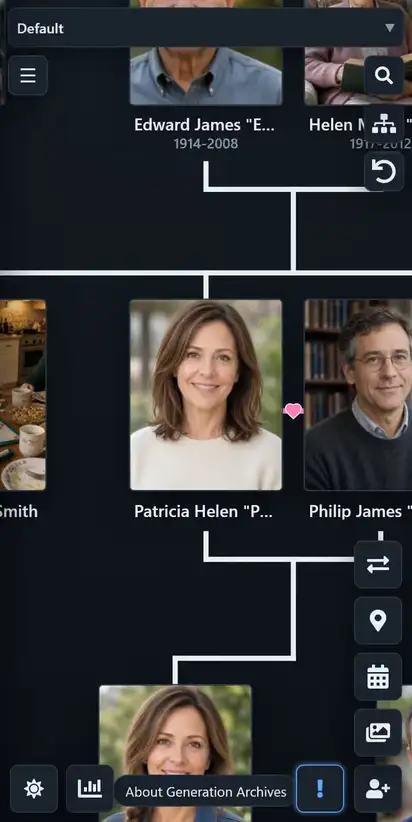
Generation Archives is a family tree you open in a web browser, including the browser on your phone. The tree is free. There is no subscription. A single banner ad may show on the site. It stays off when your account has more than 100 MB-years of storage left, and it stays off for everyone on a tree that has a custom URL. The sample tree is a filled-in Smith family you can move around. The blank demo starts empty so you can add people yourself. Neither one is saved until you create a free account. One account can hold several trees.
People, relationships, notes, and bios do not cost anything. If a photo already has a public address, link that image URL and it stays free. Hosting files here is optional. Media hosting is $1 per GB per year, paid ahead as prepaid credit. New accounts include 100 MB-years of starter credit. You buy more credit when you want it. The same purchase lasts longer when you store less. Nothing renews on a schedule.
Only you and the relatives you invite can see a tree, unless you turn on a public link. Private describes who is allowed to open the tree. It is a visibility setting. Leave the public link off and the tree stays with the people you invited.
If the people are already written down somewhere else, you can move them over. GEDCOM is the usual file for that. It carries names, dates, and relationships. It usually does not carry the photo files. What is GEDCOM? explains what the file holds and what it leaves out.
The same canvas works for a household you know and for people you invented. A person can have any number of parents, which is how adoptive parents and step-parents are added, and a person can have multiple spouses. Drag anyone anywhere. Auto-arrange builds a tidy generation view when you want a starting point. Several named layouts can belong to one tree, so a direct line and the full cast do not have to share one drawing. Read how to show adoptive and step-parents, or how a fictional family tree works.
You can bring a tree in and take a copy out. Generation Archives imports GEDCOM 5.5.1, GEDCOM 7.0, and GEDZIP. It exports those same formats, and a PDF, PNG, or JPEG image of the tree. A GEDCOM file has no pictures. A GEDZIP carries picture links, not the image files themselves. Tag people in photos, and keep notes and bios on the profiles they belong to.
Try the demo, open the sample tree, create a free account, sign in, or browse the articles.